So here's a question I got through the
Ask Me Anything tab:
Scrivener's in your Things I Love. How'd you learn to use it? And do you use the Mac version or PC? (I'm halfway through the PC tutorial, and wondering how I'll remember it all and how to put it to use.)
Love this question! Okay, first of all, for those who don't know,
Scrivener is a fabulous program that helps writers organize content in a lot of different ways. It's primarily helpful for people who are working on long projects - like novels, obviously - but I've also heard of people using it to write things like a thesis or other major paper. It serves as both a word processor and and repository for your research and ideas, so everything is right there in one program.
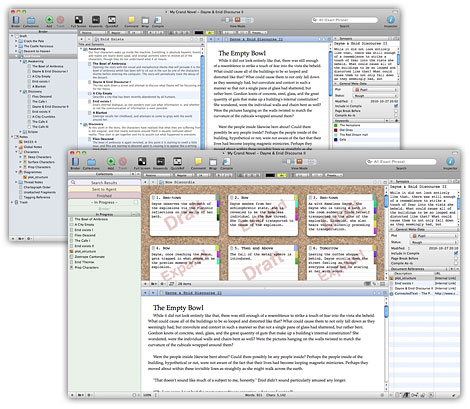
It also has about a catrillion features. To put that into context, here is a picture representing only one one-thousandth of one catrillion:
So as you can see, we're dealing with a lot of features.
Which brings me to the first part of our Questioner's question: how'd I learn to use it?
Um.
I have the Mac version. I started with the tutorials, but like you, Dear Questioner, my reaction was something along the lines of "EGADS THIS THING HAS LIKE A CATRILLION FEATURES SERIOUSLY HOW AM I SUPPOSED TO REMEMBER ALL THIS?!?!!?" Also I was chomping at the bit to just
get writing. So, I confess that I ditched the tutorials and I've mostly learned by just... playing around with it.
I know that this means I'm probably missing out on the vast majority of the Fancy Feast Features (
i'm sorry, i'm not sure when this post developed a cat-themed subtext) but even without knowing how to ring every bell and blow every whistle, I've figured out how to do everything I've needed it to do so far, and more.
The thing is, while a lot of the features are incredible - and while it's good to know they exist - you probably won't need most of them on a day-to-day basis. The majority of your time in Scrivener is going to be spent hanging out in the manuscript part of the binder and just, y'know, writing. In my experience, a lot of the fancier options are most helpful either before you're writing, to set up a good foundation with your research and plotting/planning, and after, when you're editing.
So as for how to put it to use, I can only tell you what I do, which may be completely useless to you. We all have our process, and that's why Scrivener kind of rules - because there are a million different ways to use it. (No, they're not paying me, I swear.)
But, useless or not - here I offer you:
my tutorial-free guide on how to get not-even-close-to-the-most out of Scrivener, but still come away happy, organized, and novel-ed
So. When you start a project, it defaults into giving you a few folders - one for the manuscript, one for research, one for trash, etc. (At least, that's what happens in the Mac version - I assume it's similar, if not the same, in the PC edition). I immediately create a few more: for characters, for setting, etc. If I was an outliner I'd probably have one for my outline, too. (Also, Scrivener has an amazing outliner that lets you arrange and re-arrange things, give items statuses, etc. Again, I'm a pantser so I haven't really taken advantage of this, but it looks cool. Though maybe more useful for non-fiction projects?)
The features I use the most in the planning phase are attaching photos and importing websites. As I'm thinking about world-building, I'll often attach pictures, maps, wikipedia entries, etc. to my notes so that I'll have all my research in one place. Pictures of characters, too, if they correspond in my head to real-life people.
So, once I have a world and characters to put in it (ha! It sounds so easy!) I'm ready to start writing. I break up the manuscript into chapters, and each chapter into scenes. I used to just number the scenes, but that was totally useless, so now I give them brief names so that I can see what's-happening-where in the binder as my plot moves forward. (Kind of a "duh" moment for me.) The features I use most often when I'm writing are:
Full Screen mode: a super-simple feature that is surprisingly helpful in keeping me distraction-free.
Split-screen mode: this is particularly useful when I need to refer to an event/conversation that happened earlier in the manuscript, to a picture when I'm trying to describe something, or to a piece of research. I can keep typing in one window, and have my research/other scene open in another on the same screen. So much better than switching back and forth between windows.
The notes bar on the side column: which I mostly use to make simple scene outlines, to remind myself of things that need to happen in the near future, or to help call to mind character motivations as I'm writing the scene. It's just nice to have a little place to jot notes as I go.
The word count target: I have used this less lately, but if you know how many words you want to write - per document, per day, whatever - you can tell Scrivener and it'll keep track of how close you are to your goal.
I haven't had the opportunity yet to do a ton of editing in Scrivener, but features I've found useful are:
Snapshots: If I want to try something out but I don't want to lose the original version, I take a snapshot of the document. Then it's saved, and I can revert back to it - or grab old language - if I decide that, y'know, making that character incontinent is actually gross, not funny. Phew.
Scrivenings Mode: I can highlight several chapters or scenes in the binder, and then click "Edit Scrivenings" - that lets me see them as one large document, instead of as individual scenes. It's a good way to make sure things are flowing.
Status Stamps (in Corkboard): I love the idea of the corkboard, but I haven't personally found it to be that useful (mostly because I write from beginning to end and there isn't generally a ton of shuffling that I have to do after the fact). But one thing I do like are status stamps when I'm editing. You can mark every scene's notecard with a stamp that shows whether it's in first draft, revised, or final draft mode. You can also mark documents as "to do" or "done," and you can make your own stamps, if you want. (Kind of fun to mark a finished document with "BOOYAH!") It's an easy way to see where you are in your editing process, and to quickly define and select scenes that need to be edited.
I also haven't updated yet to the newest version of Scrivener, but I'm digging the idea of collections, so I might have to do that sooner than I anticipated.
Anyway, so that's my super super long answer to your very concise question. As you can see, I don't do a ton with meta-data, and I hardly touch the corkboard or outliner. Even still, having the ability to have all my research and writing in once place, to organize my writing into chapters and scenes that are easy to see and access, to view documents in split-screen, and to keep track of my editing process is no small thing. And everything I use is simple enough to have been discovered through accident or trial and error.
I hope this was helpful! Any other thoughts on Scrivener, from those who use it?